I hope to see some of you at Rootstech in February at my Triangulation 2017 talk.
A special thank you whomever used my family tree DNA link to buy so many kits. My cost for running this blog is now paid until April. (Don’t stop now friends!)
Did you know 23andme now provides the segment data for its ancestry composition assignments? This is a pretty recent feature and might even be useful. Unlike the other companies, 23andme does its admixture (aka ancestry composition) in chunks. This may make it more accurate than the others but in any case it means that they can give us the segment numbers. Then we can compare those to our matches.
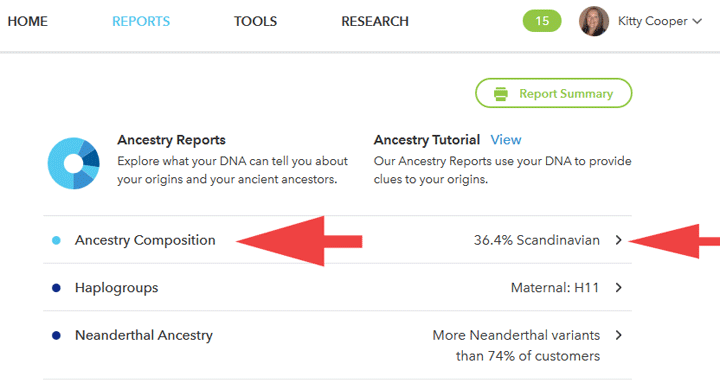
To get these numbers, first pull down the reports menu and click on ancestry. On the initial ancestry page click on Ancestry Composition or the > symbol next to your highest group. Both are marked with my red arrow below.
The next page, the ancestry composition page has the pretty chromosome picture with ancestries displayed where you can change the confidence level from speculative (50%) to conservative (90%). To get a CSV file of the segments you click on Scientific Details at the top or the bottom of this page.
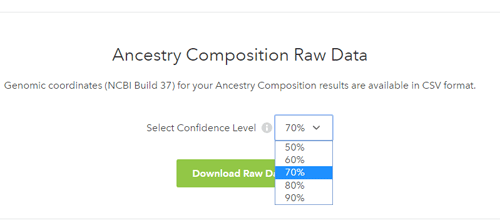
Then scroll all the way to bottom of that next page until you see this. You can select your confidence level as well for your downloaded data.
Cece Moore organized a conference just for genetic genealogy this past October in San Diego. It was terrific, the only problem was that I could not go to every lecture! Now that the videos are out, I can watch the ones I missed, including my own talk on GEDMatch.
For those of you who did not attend the conference, you can purchase all 19 videos for the amazingly good price of $99 or individual ones for $10 each. Click on the image below to order them. The quality is excellent.
Those of you who were at the conference get them as part of the package so check your email inbox for the link and password.
In recent discussions with a few of my genetic genealogy students, I discovered that many need some help with understanding how to use spreadsheets. So I went looking and found a series of excellent youtube videos that even taught me a few things. Here is the first one in the series.
He uses OpenOffice Calc which is free and happens to be the spreadsheet that I use.
The basic idea of a spreadsheet is to make a list of things that you want to keep track of, with the information about each of them listed next to them in columns. As you use it, you may decide to insert more columns, the things you are tracking for each, or more rows, the items you are interested in. You can also delete any of these and best of all, sort them.
Personally I reformat the start and stop points to have commas so I can read the numbers more easily and make the centimorgans column (genetic distance) default to two decimal places so that they line up well. I also change the font to Arial.
This is a wonderful time of year for DNA testing because both Ancestry.com DNA testing and Family Tree DNA have great holiday sales. The Ancestry.com DNA testing sale does not start until midnight EST Thanksgiving day and lasts only until the 28th. See the banner below. What’s more, if you have already tested DNA, you can upload to DNA.land and perhaps receive a full genome test for Christmas (see the read more).
In addition to the great bargain prices, Family Tree DNA has special coupons for existing users which are new every Monday. You have to log in to see yours. Click the green box marked Holiday Reward (like the image to the left here) located just above your matches on your home page there.
And let’s not forget that MyHeritage has also entered the DNA testing arena with a holiday sale price of $79. My understanding is that the Family Tree DNA lab is doing their testing so your results should be transferable to Family Tree DNA for more matching sometime in the future. Note that the National Geographic deep ancestry project is transferable already.