Archives

Preserving your Family History on a World Tree

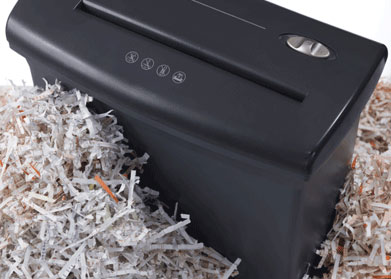
A heartbreaking moment for any family historian is when you discover that your late genealogist cousin’s wife has shredded all his papers. This actually happened in my family. I can only hope that all the genealogical information was passed on to his children first. I think he had long since given me copies of most of it.

Please don’t let this happen to your work. A good preservation solution is to contribute your research to at least one of the online collaborative world trees.

Several years ago I did a blog post on the advantages of using these world trees (click here) and created a comparison sheet of the big three world trees (updated version at the end of this article): FamilySearch.org, GENI.com and WIKItree.com

I also did a Rootstech talk on this topic (click here for those slides). There have been a few changes since then, mainly around DNA and whether or not you can upload a GEDcom.

DNA connections

DNA features abound at WIKItree.com – you can connect your WIKItree profiles to GEDmatch by putting their kit numbers in. This causes the GEDmatch one-to-many tool to display the blue word Wiki which links to your compact tree. So even though it is the smallest of the three world trees, it may be best for genetic genealogists. Another WIKItree feature is that you do not need to login to see trees and profiles so it is great for sending tree links to new cousins. Plus it shows X and Y descendancy pathways.

GENI can link to DNA profiles at family tree DNA and will even display haplogroups on the person’s page. When you and your DNA matches have your family trees on GENI, you can quickly see how you are related. Click here for the blog post I did on how to link your ftDNA reults to GENI.

example of DNA display at GENI

FamilySearch does not have any DNA features yet but surely they will eventually incorporate something.

Adding GEDCOMs

The big news is that GENI now has a GEDcom uploading capability again. Whereas WIKItree has dialed back on the GEDcom uploads but still has good functionality.
Continue reading

Ancestry Improves the Potential Parent Box

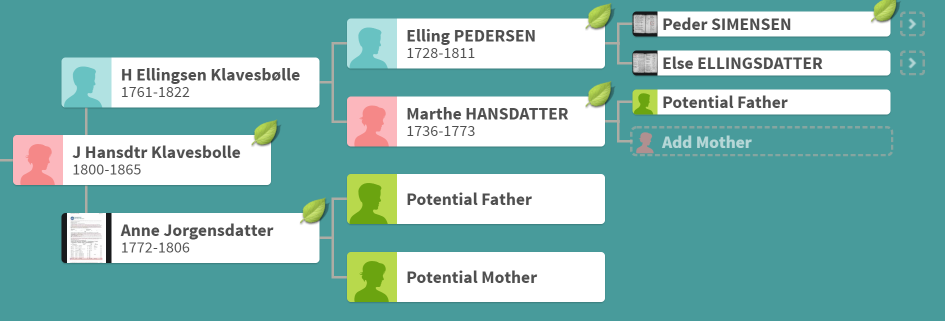
Have you seen those boxes with green silhouette images in your tree titled Potential Father and Potential Mother? This feature has recently been greatly improved.

When you click on one of these boxes, Ancestry tells you that it has perhaps found that parent, like the image to the right, and it offers you two buttons, one to review the details and another to add this person manually. Clicking Add Manually just pops up a box with empty slots for you to add that person.

Review Details used to only show you the family information for the person that Ancestry had found, but not where it was from. Sometimes, if it looked accurate, I would click the “Yes” green button to add it for a quick and dirty (Q&D) tree I was making to search for an adoptee’s family. Sometimes it was easy to reject when the family information did not match. However mainly I would go to the hints for that person from their profile in my tree to see if I could figure out the possible parent from there. All in all, the Potential Parent box was only a little bit useful.

So how have they improved this?

Continue reading

Finding Matilda

Matilda Andersen Munson, Jeanie’s great grandmother

When my cousins do DNA tests at my request, I reward them with a family tree that goes back several hundred years. Of course one line (mine) is already done! This has been great fun for me as I have learned much about early America by researching my relatives’ ancestors (I have no colonial ancestry of my own).

However Norway, my father’s ancestral land, is my area of expertise. Many Norwegian records are online in their free archives and many localities have local history books or farm books, available at a few genealogy libraries like the one in Salt Lake City. Called “bygdebøker,” these books include the genealogy information for the people on each farm. Click here for the family search wiki entry about “Norwegian Farm Books.”

There is also a fabulous Norwegian genealogy group on FaceBook with many helpers who speak Norwegian. Plus there is an online OCR program for Norwegian that works well for turning those farm book entries into text so google can translate them; click here for my blog post on using it.

Christan Severis Munson, Jeanie’s great grandfather

My second cousin once removed, Jeanie, is descended from one of my grandad’s older brothers, Christian Munson, a midwestern minister, and his wife Matilda Anderson, She is a maternal line ancestor (think mtDNA) who was the mystery to solve. Matilda’s story is sad in that she had some sort of breakdown after her last baby died of encephalitis (yes I looked at the death record) and she was institutionalized for the rest of her life. They were living in Brooklyn at the time so there are many records both online and at the municipal archives which I visit twice a year (along with my NYC based grandchildren).

With a name like Matilda Anderson, I expected it to be difficult to find her ancestors, but luckily I found a marriage record on Ancestry for her and Christian Munson in the Lutheran church records. Church marriage records are wonderful because they have the names of the two fathers, if you can read the script.
Continue reading

Fun New Features at Ancestry DNA

I really like a number of the features that have come out recently at Ancestry. My favorite is that the total amount of DNA shared with each DNA relative is now shown on the match list page in centimorgans (cMs). This means that you no longer have to click through to the match page to find that number. Those total cMs are needed in order to look up the possible relationships at the DNApainter calculator. You want to check there because the cousin designations at Ancestry are just groupings based on the amount of DNA and many relationships share very similar cM numbers.

Look at the current top of my 2nd cousin list. These are all children of my first cousins except C.S. who is the grandson of a first cousin. (spot quiz – what is my relationship to each of them? Answer at the end of this article). In each case it shows not only the possible relationship but also the actual cMs and the number of segments.

The other recent feature that I truly appreciate is that Ancestry.com indicates whether there is a family tree linked to the DNA, a tree that is not linked, or no tree at all next to the View Match button. In the past there would only be a tree listed when it was linked to the DNA, so you had to go to the match page to see if there was a family tree that was just not connected to the DNA. A word of warning about unlinked trees, they may not be for the tested person. One of my real second cousins did his DNA test through a friend’s account so he is not in their tree at all!

Did you notice that little blue compare icon under the green View Match button? Click on that to get a comparison of the ethnicity of two tests. It always fascinated me to see the amount of difference between two full siblings. Here I am compared with my brother (click it for a larger version).

A word of warning. A friend complained that his sister only had a tiny amount of XYZ heritage while he had a good 33%. I pointed out that her ethnicity had not been updated to the new version. Once that was done, she had a bit more XYZ than him!

Another benefit of this comparison is the much larger versions of the profile pictures which are on top of the ethnic breakdowns on that page. Space considerations got me to cut them off in my image above. However it is quite nice to get a better idea of what your match looks like than you get from the tiny picture on the match page.

Now for a discussion of the new traits feature …
Continue reading

The We’re Related App

UPDATE: 16 AUG 2019: Ancestry has shut down support for this app. It is no longer available.

I have shown a number of fellow genealogists the We’re Related app from Ancestry on my smartphone because it is so much fun. Let’s face it, we all like being related to famous people. My latest “famous” match is my 7th cousin thrice removed, Hans Christian Andersen, which delights the writer in my soul.

This app has also figured out how I am related to a number of my Facebook friends. Of course, they are usually cousins I that found myself with genealogy or DNA and then friended. I must have connected this app to my FaceBook account when I first installed it and of course I connected it to my Ancestry account as well.

An exciting recent surprise was that We’re Related found my relationship to fellow genetic genealogist Kelly Wheaton, famed for her free online beginning genetic genealogy course. We had long wondered about a smallish DNA segment that we share on chromosome 16, which is also shared with other relatives, so expected to be real. We had assigned it to a location – Seljord, Telemark, Norway but had not figured out the ancestor.

Tree Icon

In the app, each cousin match has several icons below it (two on my phone, three on my tablet). The one with two boxes then another below them represents a family tree. Click on that icon or the person’s photo to learn more about the relationship. Although you most often share an ancestral couple, it only shows you one of them, usually the man for most of mine.

Continue reading