Archives

DNA testing finds some more Skjold cousins

Hans Martin Gunderson

Hans Martin Gunderson

The randomness of DNA inheritance always amazes me. My Norwegian-American father seems to have inherited more DNA from his Skjold grandad, “Dada,” than his Wold grandma, “Mormor.” Dad shares more than the expected amount of DNA with 3rd and 4th and double 4th cousins on his Skjold line. Of course this could also be explained by the slight endogamy in the area they come from, Etne, Hordaland. By comparison, Dad shares no DNA with a Wold 3rd cousin once removed and only a small amount with her mother. He shares more with a few other Wold cousins but it tends to be less than the expected amount with the more distant cousins on that line.

Recently I found two new Skjold cousins via DNA testing, Maria and Irene.

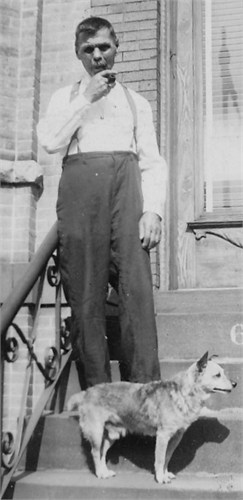
On Ancestry.com, a 3rd cousin match appeared for my brother which turned out to be a real 3rd cousin, a Gundersen relative who is descended from Dada’s sister Margareta. Her son who immigrated to Brooklyn, Hans Martin Gundersen, is pictured on the left.

On 23andme.com, I found a new 3rd-4th cousin on Dad’s list, who was found to be from another branch of our Holland relatives. The Hollands descend from Dada’s Aunt Mette (see my post with her portrait). My father’s newly found 3rd cousin twice removed shares 1.10% of her DNA with him: 4 segments totaling 84cM. This is on the high side, more like a second cousin once removed (click here for the article at ISOGG about the expected amounts of shared DNA).

So read on for the details of how I figured out the actual relationships with my new cousins.
Continue reading

Ask for genealogical help and be rewarded

There are forums, mailing lists, and facebook groups for almost any group with shared ancestry and the people who populate them can be amazingly helpful. So here is how I solved a mystery with assistance from various Norwegian helpers.

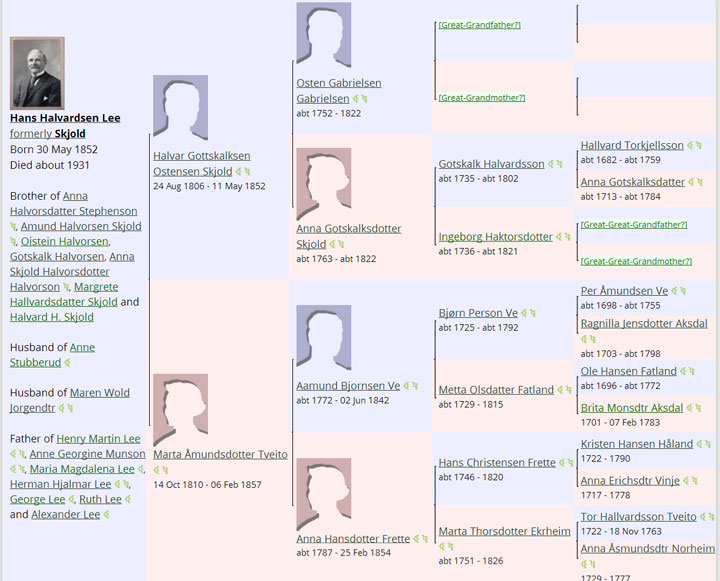
I have recently been working on the ancestors of my g-grandfather H. H. Lee (originally Hans or Halvor Skjold) from Etne, Hordaland, Norway since I have so many new relatives from his families found with DNA testing. When last in Salt Lake City, I photographed numerous pages of farm entries from the Etnesogas at the family history library and took several of his lines much further back. See the chart below (from wikitree) for those annoying blank spots I wanted to fill in.

I found the ancestors of Ingeborg Haktorsdtr, one blank spot below, in the Holmedal books. But my 3rd great grandfather Øystein Gabrielsen Bjørgjo evaded me. He appeared as if by magic on the Bjørgjo farm with no clue as to his origins. I tried the online Norwegian archives with no success, perhaps because they are a bit difficult for us English speakers. So I decided to ask for help.

Wikitree tree for H H Lee

My great-grandfather’s pedigree at Wikitree

Continue reading

More on Norwegian naming practices and how to list them in your GEDCOM

On GENI.com and wikitree.com they allow birth surnames for men and women which makes life easier for those of us with Norwegian ancestry since the farm name of birth can go into the “maiden” name slot for both sexes and the farm where they lived most of their life into the surname slot. It is important to use the farm name as a surname and put the patronymic in as a middle name, since it makes it much easier to find and identify an ancestor. There are so many Ole Olesons and Lars Larsons otherwise.

ArvegodsThis wonderful blog post explains Norwegian naming in great detail.

http://arvegods.blogspot.com/2012/02/norwegian-names.html

Sadly she has not written very many blog posts.

[UPDATE 9-AUG-2017] That author, Anne Berge, told me to send people to this page instead for her Norwegian DNA project at Family Tree DNA:
http://www.norwaydna.no/gedcoms-and-genealogy/norwegian-names-en/norwegian-names-in-genealogy-software-en/
[END UPDATE]

I found the original on this page at GENI which discusses Norwegian ancestry in detail.

http://www.geni.com/projects/Norwegian-Ancestry-information/11383


Translating Farm Books Using a Norwegian OCR program

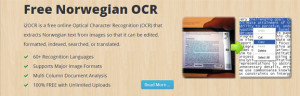
NorwegianOCR
When I scan in documents I use a product called PaperPort for my Optical Character Reader (OCR – turns images of words into text that can be edited in a word processor) but it does not know about Norwegian characters.  So it has been a lot of work for me to clean up the result of a Norwegian scan in order to use Google Translate on it. Needless to say, I was delighted to read that there is an online OCR program for Norwegian!   Jim Bergquist, a fellow subscriber to the rootsweb Norway list, posted the step by step process to that group for translating farm book entries using this tool and he has given me permission to rephrase his method on this blog. Here it is:

  1. Crop the text part of your scanned image and save as a separate image file. Make sure to do a multi-column pages one column at a time.
  2. Go to http://www.i2ocr.com/free-online-norwegian-ocr . This is an online Optical Character Recognition tool. You don’t have to download or install any software.
  3. Instructions at the bottom tell you to:
    1. Click the “File” radio button. Press “Select Image”. Use the file box to navigater to where you put the image on your computer.
    2. Leave the language in Norwegian.
    3. Enter the two numbers or words separated by a space. These are used to prevent automated robots from using the site for hours.
    4. Press “Extract Text.”
  4. Three buttons will appear at the bottom of the screen and the extracted text will be in the left hand box (see example below).
    • Download, to put it on your own computer (a good choice).
    • Translate, I haven’t used – it may send it as-is to Google Translate. However, OCR usually requires some corrections to be made, so you should look at the result and correct it before trying to translate.
    • Edit in Google Docs, if you are familiar with working on documents in the cloud.
    • Of course you can just cut and paste the text in the left hand box over to your word processor instead of any of the above options, which is what I did.
  5. When you have corrected any OCR errors in the file, select the text and paste it into Google Translate.

Continue reading

Searching the Norwegian Digital Archives, a Rootstech Talk

UPDATE 13 DEC 2020- the archives have a new look and new site at: https://www.digitalarkivet.no/en/

Many of us Norwegian-American researchers have been complaining about the new archives and its search function. So I went to the talk by Finn Karlsen of the Digitalarkivet hoping to gain a better understanding. Of course the first thing he told us was that the old archive would die at the end of March as would the links we might have been using in our trees to reference data there. This is not news as we have been hearing it for a while.

After listening to him I thought I understood what I had been doing wrong with my searches at the new digital archive site – I had not understand how to correctly use wildcards there. Apparently the asterisk * wildcard can only be used at the beginning or end of a word, not in the middle. Also the pipe character | can be used as an OR.

Finn of course made it look easy with his examples of searching. He promises to have his presentation posted at his website [UPDATE 13-DEC-2020: site no longer available]

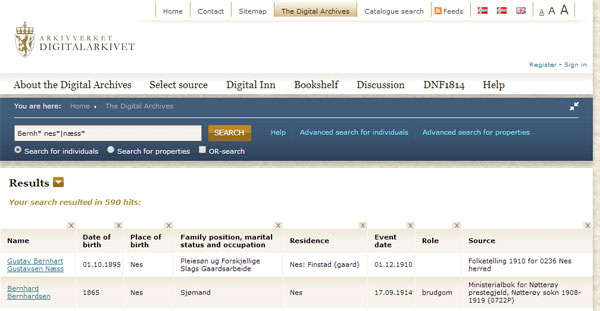
The simple search example he gave in his talk was

Bernh* nes*|næss*

So I tried that at home and got this:

DigitarkivSearch Continue reading