Archives

The Basics at 23andMe

My family members asked me to write a 23andme tutorial, so here it is. Let me know what else I should put here.

The three things most people like best at 23andme are learning about their health issues (currently disabled for new kits because of the FDA ruling),  their ancestral places of origin, and finding DNA cousins (my term for people who share DNA that thus, must be related, however distantly). There is a wealth of other fun information available like how much Neanderthal DNA you have in you, but this post will mainly just cover those first three areas.

When you log in to 23andme you will see a page something like this.
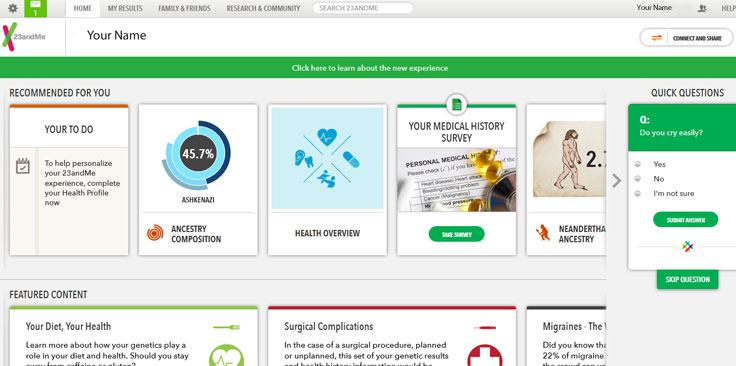
Home Page at 23andme

You can click on Home in that top bar from any page on the site to return to this page. The ancestry composition box shown mid-page may not yet be ready for your sample if your results are just in.

To edit your profile, click on your name or photo on the  far top right to get a menu with that option. If you have any messages the envelope at the top right will get a green background and show the number of messages you have as in the example below.  Click on it to read them. I advise switching to email if you start to communicate with someone regularly as there are no tools to search the inbox unless you use chrome and the 23+ addon.
Continue reading
Chrome Browser Tools for 23andme

I just found out about two wonderful browser helpers for 23andme that work only in Chrome and installed them both. So far I am absolutely delighted with them.

  • 23++  totally redoes the 23andme inbox so you can search by name or subject. Since I have a few hundred messages by now this is essential. I had been continuing many conversations via email partly because the inbox at 23andme was so limited. This addon also adds functionality to the relative finder, as well as other features
  • 529andyou collects data in your local chrome mySQLlite database every time you look at the table comparison in the ancestry lab Family Inheritance Advanced and puts an icon on the far right side of the url box at the top that you can click to see this data

So my first effort with 529 was to look at my three 5th cousins that are all descended from Isaak and Sara Steinhardt:

Continue reading

New Ancestry Composition Tool at 23andme

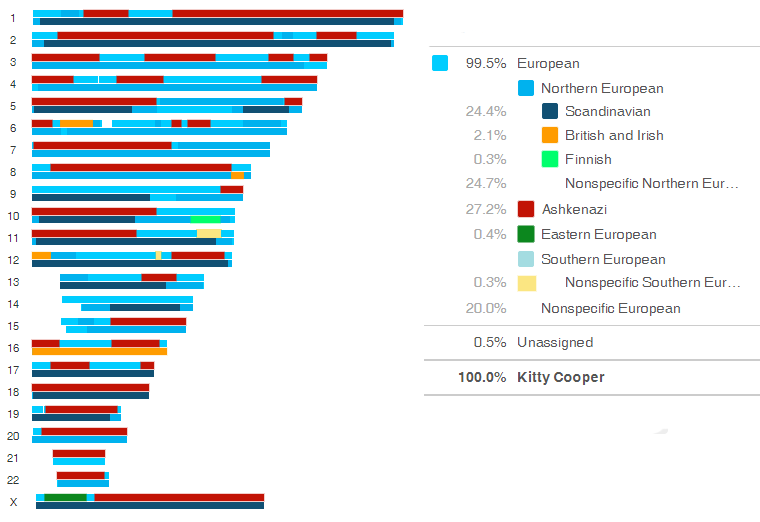
There is a terrific new tool at 23andme for looking at your ancestry. Cece Moore describes it in great detail on her blog post here. I very much like the chromosome mapping part but the colors are incredibly boring if all your ancestors were european. Just shades of blue that were hard to distinguish one from another. So I changed the colors for Finnish, British, Ashkenazi, Eastern and non-specific Southern European

Here is my picture (I am half Norwegian and half German with half of the German being jewish, so a quarter Ashkenazi):

Continue reading

Ashkenazi Genetic Pile Ups?

Well I thought I had found a real cousin on the German Jewish side due to a few common surnames but no luck finding the relationship yet. Sadly there is a large match on our X but the common surnames are not on a branch where X could come from. Of course one of the problems in German Jewish genealogy is that all but a few prominent families had no fixed surnames (they used their father’s name) until 1813/14.

Even worse she mainly matches me on segments that are what I call “Ashkenazi Pile Ups” or locations where there are well over 30 people matching me but not my Dad for more than 5cm.  By comparison I notice only one such pile up on my 100% Norwegian father’s matches at chromosome 9, at about 80,000. But that will be the topic for another post.

These are the three pile ups my new distant cousin matches:

Chromosome 2:  45 matches for this segment at 23andme

150.1 163.3 9.9CM

Chromosome  4: 80 matches for this segment at 23andme

some start at 18.1 and some end at 25.0

19.4 24.8 7.2CM

Chromosome X: about 30 matches for me, 50 for my brother…. hmmm

a few are longer than this

123.4 137.8 14.1CM

For those of you who are wondering where to find this data on 23andme you can download all the segments that match yours with the name of the donor (most will be anonymous) by going to “ancestry labs” under ‘My Results” and clicking on “Countries of Ancestry.”  Scroll down the page to the long blue button where you can download a CSV of all your matches. [updated 27 dec 2013 – n.b. you can get this data and more  by using the http://DNAgedcom.com site to do the downloads]

There are a few more pile ups in my and my brother’s matches than these …

Continue reading