Archives

My Fastest Father Find Ever

Randi contacted me for help finding her unknown biological father. I advised her to test at Ancestry and get back in touch when her results were ready.

When they came in, it took only three hours to find Randi’s unknown biological dad! She had two second cousin level matches at Ancestry with good trees who did not match each other. That meant that the search would likely be easy, since all I had to do was find where those two trees intersected. Here is how I did that, step by step.

First I created a private searchable tree at Ancestry to use for this case. I started it with Randi and her mom. planning to make floating branches for related people by copying the relevant lines over from their trees.

The best DNA match on Randi’s unknown father’s side was Brad at 322 cM. So using ProTools, I sorted the matches Randi and he shared by his closest matches, as shown in the image below.
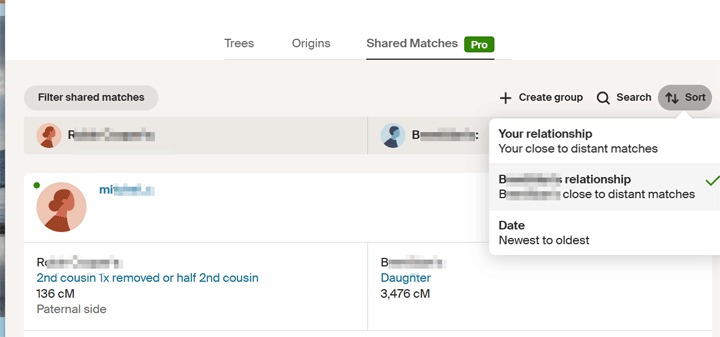
Clicking on the sort button brings up a box where you can select to sort by the match’s relationship

The idea was to find the common ancestor among those matches. This would be the line that Randi is related on. To do that, I should have looked at the best one with a tree, excluding close family, but I saw that there was one a bit further down the list, Bob, who had an unusual surname, call it Roper, that was the same as one of Brad’s great grandmothers. So I built her tree back up a few generations and down again. I then copied Bob’s paternal ancestors over, looking for an intersection. I did not find one, so I moved on. Later Brad told me that the error was two women with the same name and birth year incorrectly in various trees, including his.

So I went back to the common match list and found the best match to Brad with a tree (Peggy). One of her grandmothers shared a surname, call it Whistler, with the husband of the Roper great grandmother. So I built the Whistler tree. Quickly found a common ancestor for Peggy and Brad with an unusual first name born in 1830. Built the tree of all his descendants. Somewhere in that tree will be our man.

Time to look at the other possible second cousin match, Jim, at 268 cM. The plan was to repeat the process of finding the common ancestor to his best match with a tree. However, his surname, call it Wander, had already showed up in the Whistler tree. Having collected all the descendants of Brad’s Whistler great grandparents, I noticed that one of them had married a Wander. Was that Wander in Jim’s tree? Yes, she was his aunt!

That Whistler-Wander couple, who must be Randi’s ancestors, had two children, a boy and a girl. The boy was the right age and in the right location. Could it really be this easy? Yes. The details of his life fit what was known. Since Randi’s presumed father is Jim’s first cousin, Jim is Randi’s first cousin once removed.
Continue reading

The new clustering tool at Ancestry

Ancestry has been rolling out its clustering feature this past week to those of us with a Pro Tools subscription. If you have it, there is a new button at the top of your list of matches with an icon that says “By Cluster.”

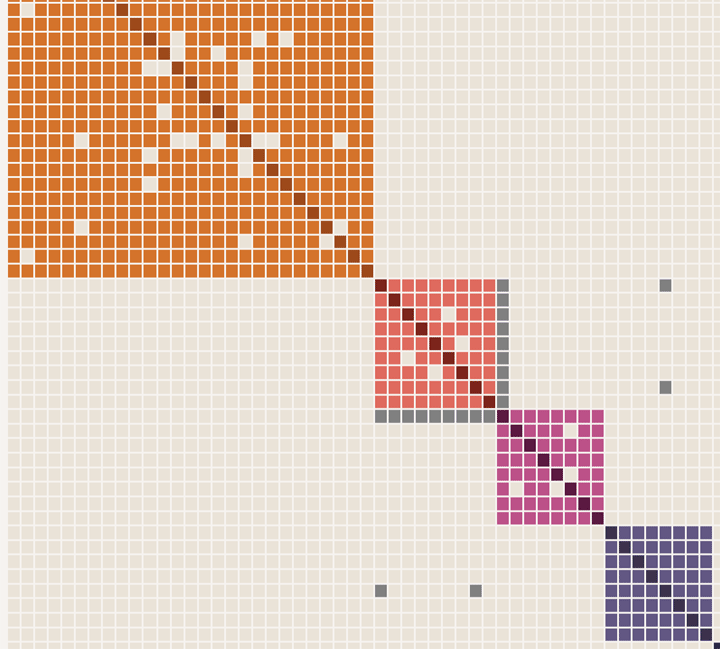
The purpose of clustering is to create an easy-to-use visual way of organizing DNA matches that are related to you and to each other. The graphic sorts the matches who share 65 cM to 1,300 cM with you into groups who also share at least 20 cM with each other. Each match is listed in the rows on the left as well as by initials at the top for each column. In a perfect world, you would get four colored boxes, like in the image below, where each box represents the line of one of your grandparents.

The image above has actually had the top box truncated and two additional boxes removed for illustration purposes. The left side would have the full name of the match while the top has just the initials.

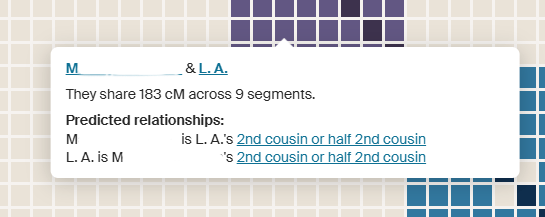
Some matches will also have additional matching that does not fit the groupings. Those are shown in gray.The darker boxes on the diagonal are where the same person meets themself. Note that all the boxes, even the ones that are not colored, are clickable to show who the two people that intersect there are, with all the details of that match. Plus the names can be clicked to go to those match pages. Clicking a square brings up a box like in this image.


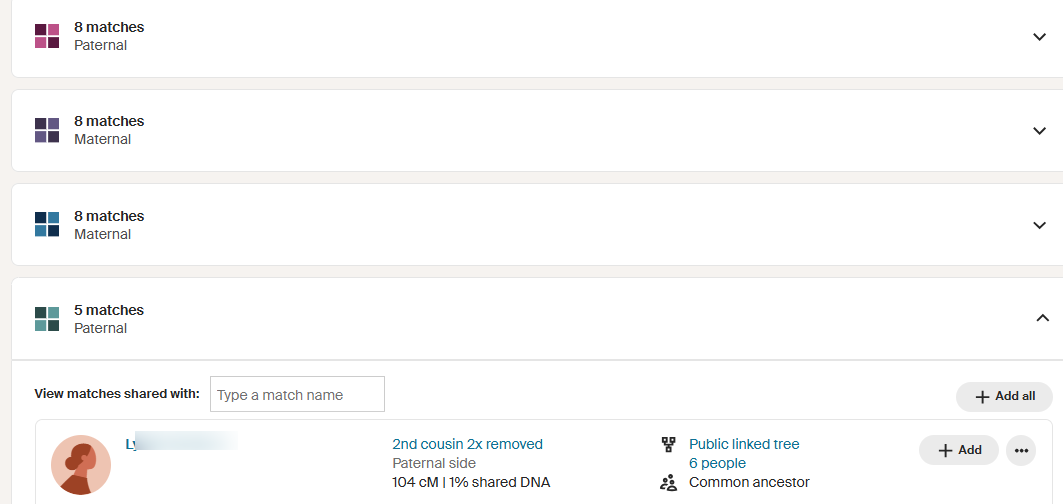
Below the diagram there is  a list of the clusters. Click on any one to see the members of that group. Notice that each member has all the information you would see about that person in your match list. Another nice feature is that you can add everyone in a cluster to a colored dot group by clicking on the “+ Add All” button.


While this sounds like a wonderful new tool, for many of us it needs the ability to specify the range to include in order to get the best boxes. Below is what a Jewish friend of mine gets; lots of clear small boxes, but everyone is related to everyone else outside of the clusters, except for her middle box. This is what endogamy looks like!

Continue reading

A Breakthrough in my German DNA

Modern day Germans do not seem to do DNA testing. I have one German grandparent born in Munich, with several generations of Bavarian ancestors, whose line I never get any matches to. Since this is my mother’s mother’s line with the paternal lines proven, the lack of matches is not due to an NPE (non parental event). For example, I have one German half 2nd cousin on my maternal grandmother’s father’s side who tested at my request (click here for that post).

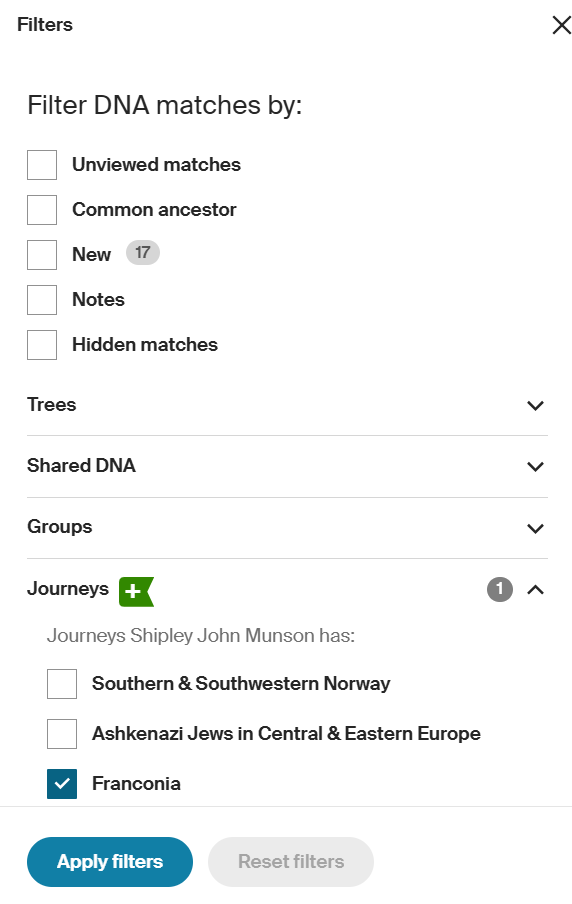
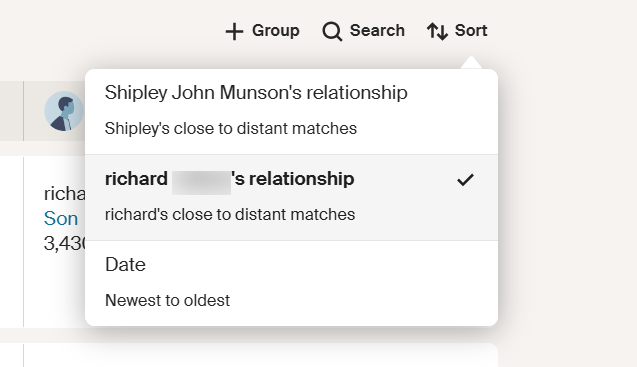
Ancestry has a nice new feature where you can filter your matches by Journeys (where your ancestors came from); see image to the left. I was disappointed not to have any German journeys, but my brother has something called Franconia. When I used that filter I found a good match at the top of his list. Richard, from Pennsylvania (think Pennsylvania Dutch aka Deutsch), with an Italian surname, shares 72cM with my brother, 62 cM with me, and 25 cM with our first cousin Margaret. Richard’s tree had no ancestors listed, but his closest shared match to us, a great nephew, did have a small tree. One thing I like to do with my Pro Tools is to change the way matches are sorted to be by the best ones for the match I am looking at, rather than the usual sort of those closest to me (see image below). Their close matches often have better trees or have notes I wrote to myself when I figured them out long ago.

That nephew has all but one person showing as private in his tree. Luckily the one person whose name shows has the same surname as Richard. Next I clicked over to her profile page and used the Ancestry search function to find a more complete tree for her, which included her parents. Her mother Frances had a surname, LANG, that I knew was in my tree. She was even born in the same town, Eslarn, Bavaria, as my great grandmother Margaretha Wittman! Another search at ancestry found Francis’ Eslarn grandparents’ names in yet another tree, whose owner was also a distant DNA match.

There is a useful German website – https://www.ortsfamilienbuecher.de/ – which has genealogy information from many German town lineage books, including the one for Eslarn. You can list everyone with a specific surname in your town to search for an individual. Be sure to check alternate spellings. Armed with the names of Frances Lang’s grandparents, I went to that source and traced her mother back to my great grandmother’s grandparents. This was not easy because the same names were used over and over again. Frances’ mother had the same name as my great grandmother. Also their fathers, who were uncle and nephew, had the same name, Joseph Widmann/Wittman. Complicated to figure this out, but birth years helped.

Continue reading

New Sort Option for the Ancestry Pro Tools DNA Match List!

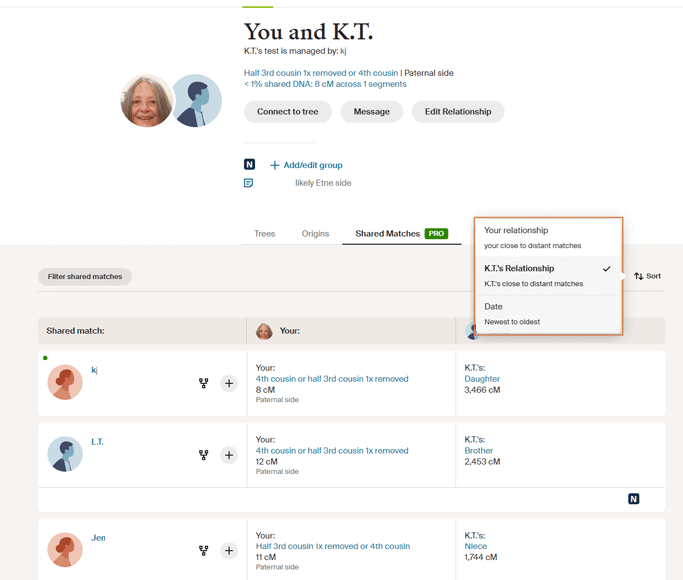
Many of us got the Ancestry Pro Tools to see how our matches were related to each other; then we got frustrated when there were many pages of matches that could not be sorted by the closest matches to that match.  Look at the image below. The sort feature we wanted is here!

On the far right above your match list it now says Group Search Sort. If you click the sort button, it pops up a little box which gives you the option to sort by your closest matches, your match’s closest matches, or by the date.

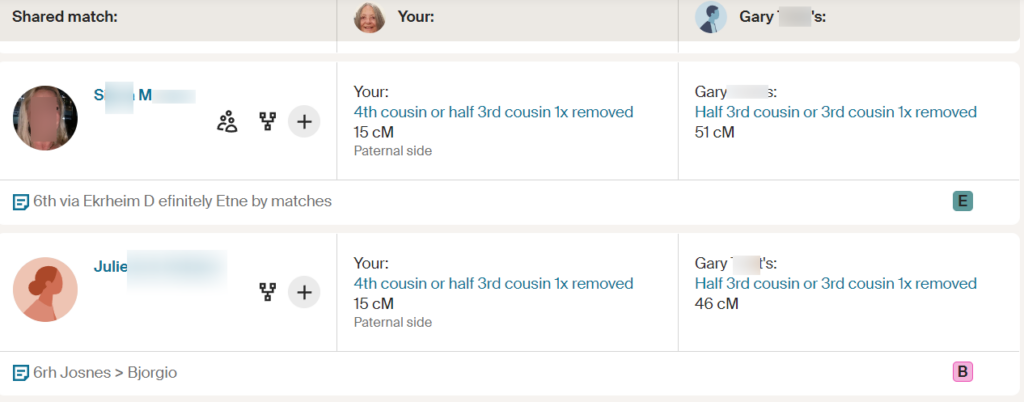
The advantage of sorting by your match’s matches is that you can now quickly see if you have already solved the relationship to one of their close family members. The first few words of whatever you put in the notes for that match are listed. Plus if Ancestry has found a relationship there is a little three person icon. More on the basics of the pro tools are in my June blog post (click here). Meanwhile, if this has not rolled out to your pro tools account yet, there is a workaround mentioned by Leah Larkin in her facebook group – The DNA Roundtable – just add
?sort=MATCHING_RELATIONSHIP
to the end of the URL on the page with your match

Remember, this new feature only works if you have the Ancestry Pro Tools which I have heard are on sale for the Holidays at a bargain price

Finally, a Reason to Get Ancestry Pro Tools!

Ancestry has released a new feature that many of us have been eagerly waiting for: how much DNA your matches share with each other and the estimated relationship between them. This can help when a new match has no tree, for example, if their sibling or parent has one. Read on for a description of my first experiments with this tool.

Most Mondays I go look at my new DNA matches on Ancestry. Typically I first click Unviewed and then click Common Ancestors.

The buttons I click (added arrows are mine)

If no matches come up, then I unclick the Common Ancestors button in order to see all the new matches. Next I sort them by date to see the most recent first. Sometimes I first pick one parent or change the range of cM to view (via the button called Shared DNA). Then I scan the resulting list. I typically click on the new matches with trees and the most DNA. I find that if you contact people when they have just received their results, they are more likely to respond.

I had a wonderful surprise when I clicked on a new DNA relative’s name to go to their match page with me: a message informing me that if I upgraded to the Pro Tools I could see how my matches were related to each other including the cM. Of course I upgraded, only an extra $10 per month. By the way, as they are just rolling out this feature it is a bit slow today from all of us trying it out.

My match with Gary turned up two distant relatives from different lines, perhaps I can figure out where he fits in

Now my page for that new match looks like the above. Note that you can click on the projected relationship to get the full explanation including unweighted DNA and longest segment just like on a match page.

However on the shared matches page my colored dots have changed to squares with the first letter of the group. Not sure how I feel about that change. A benefit is that it shows you how many people are in that group when you go to the edit groups. At least the colors are almost the same. On the trees and ethnicity pages it is the same colored dot as before, for now.

A few glitches occurred. I was not able save the new notes I made from the shared matches page. I can only save them from the tree and ethnicity pages. Also it was easier to set the colored dot group on those pages, as the save from the shared matches page seemed delayed.

Continue reading